PiSugar Wifi Config

English | 简体中文
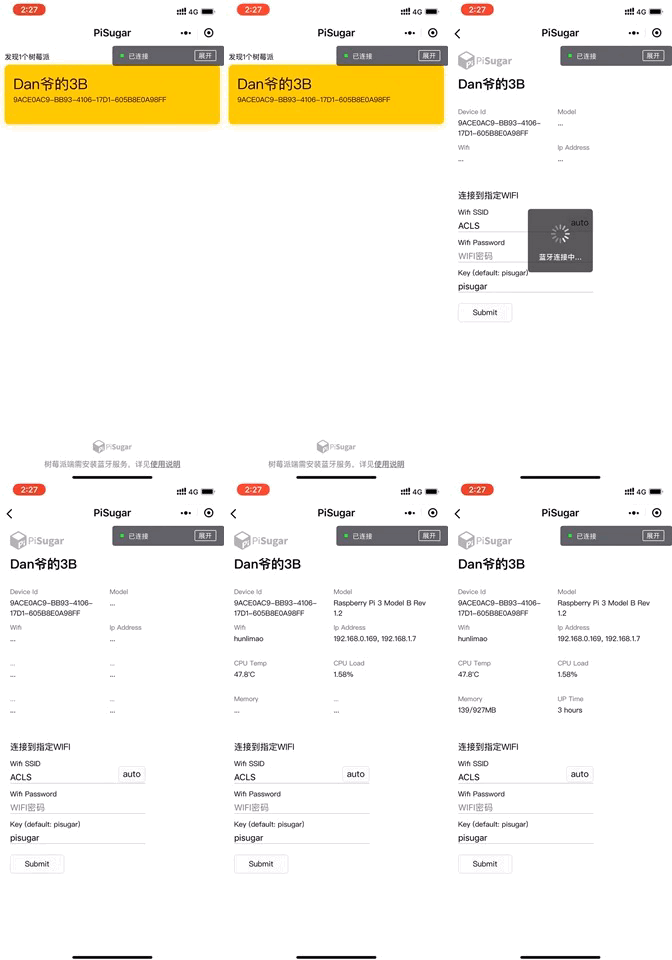
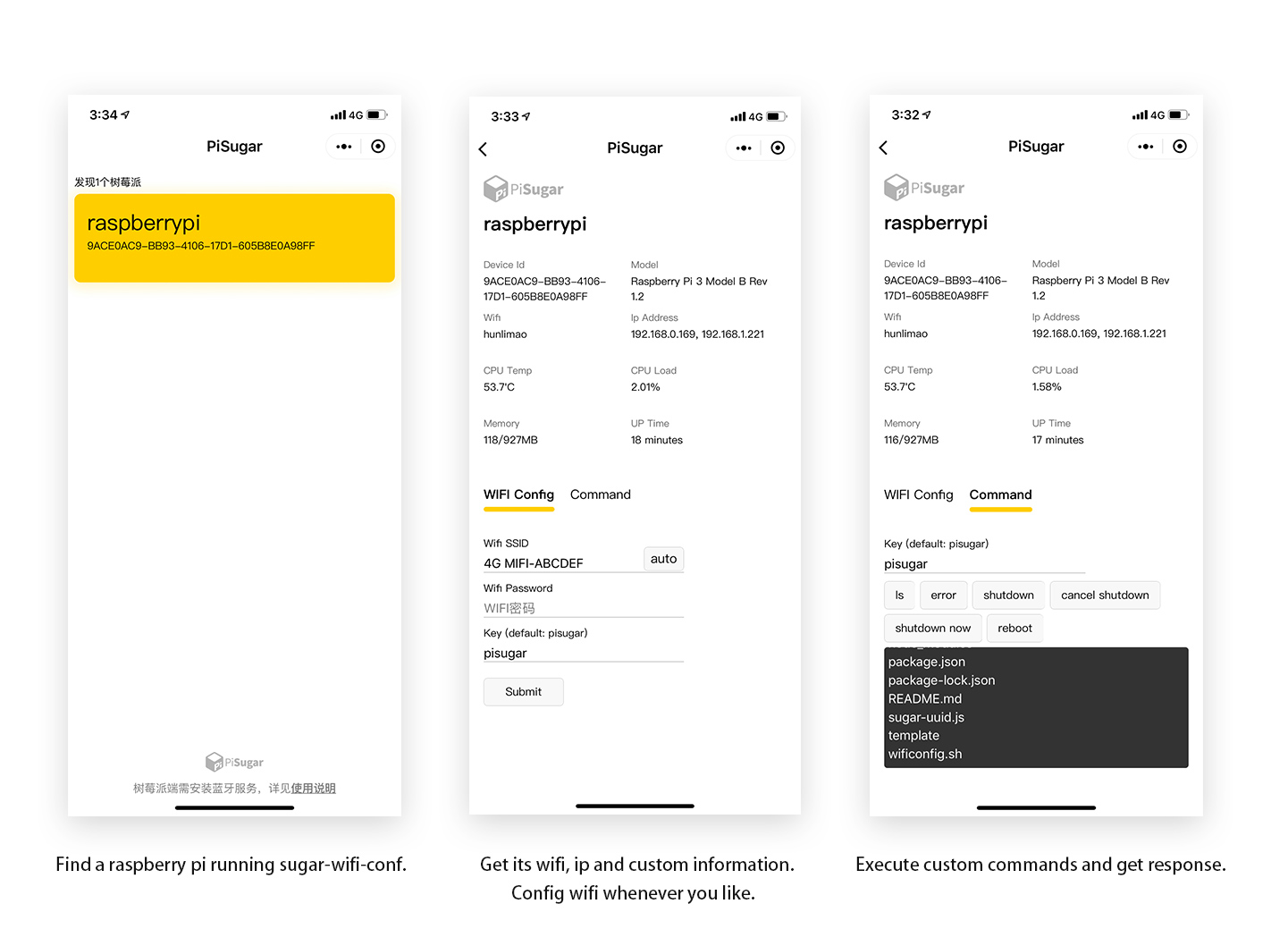
A BLE service to configure wifi over bluetooth for a Raspberry Pi. You can:
- get wifi name, ip address, pi model
- config wifi
- get other custom info, e.g. CPU temperature, CPU load, or whatever you can get by shell
- remote control the pi to execute shell script and get response, such as shutdown, reboot
Tested on Raspberry Pi 5B/4B/3B/3B+/zero w/zero2 w (models with bluetooth) with Raspbian.
Client-side app includes PiSugar APP (supports wifi config from 1.1.0) and Wechat miniapp, please scan the QR-code above to download.
Source code of Wechat miniapp is in folder /sugar-wifi-miniapp.
If you don't have wechat, you can use web-bluetooth to connect to your pi. Make sure your device and browser support web-bluetooth api, visit https://www.pisugar.com/sugar-wifi-conf to connect. (Tested on MacOS and Android with Chrome, iOS WebBLE browser) Source code of web-bluetooth client is in folder /web-bluetooth-client.
Install
One-liner install (recommended)
Download a pre-built binary and install as a systemd service — no Rust toolchain required:
curl -sSL https://repo.pisugar.uk/PiSugar/sugar-wifi-conf/raw/master/install-bin.sh | sudo bash
To install a specific version:
curl -sSL https://repo.pisugar.uk/PiSugar/sugar-wifi-conf/raw/master/install-bin.sh | sudo bash -s -- v0.1.0
Supported Raspberry Pi models:
| Model | Architecture | Binary |
|---|---|---|
| Pi Zero, Zero W, Pi 1 | ARMv6 (armv6l) | sugar-wifi-conf-armv6 |
| Pi 2, 3, 4, Zero 2 W (32-bit OS) | ARMv7 (armv7l) | sugar-wifi-conf-armv7 |
| Pi 3, 4, 5, Zero 2 W (64-bit OS) | AArch64 (aarch64) | sugar-wifi-conf-aarch64 |
The install script automatically detects your architecture and downloads the correct binary.
Build from source
Source code is in the /rust directory.
# Build and install from source on the Pi
cd rust
curl --proto '=https' --tlsv1.2 -sSf https://sh.rustup.rs | sh -s -- -y
source "$HOME/.cargo/env"
cargo build --release
sudo mkdir -p /opt/sugar-wifi-config
sudo cp target/release/sugar-wifi-conf /opt/sugar-wifi-config/
sudo cp ../custom_config.json /opt/sugar-wifi-config/
Or use the install script:
cd rust && sudo bash install.sh
Usage
Start BLE service (default)
# Start with default settings
sugar-wifi-conf

# Start with custom parameters
sugar-wifi-conf --name raspberrypi --key mykey --config /path/to/custom_config.json

# Or use 'serve' subcommand explicitly
sugar-wifi-conf serve --name raspberrypi --key mykey
Interactive config editor
Edit custom_config.json interactively from the command line without manually editing JSON:
sugar-wifi-conf config --config /opt/sugar-wifi-config/custom_config.json
This opens an interactive menu where you can:
- View current info items and commands
- Add / edit / remove info items (label, command, interval)
- Add / edit / remove commands (label, command)
- Save changes or exit without saving
Example session:
=== Sugar WiFi Config Editor ===
Config file: /opt/sugar-wifi-config/custom_config.json

1) Show current config
2) Add info item
3) Edit info item
4) Remove info item
5) Add command
6) Edit command
7) Remove command
8) Save and exit
9) Exit without saving

Choice: 1

--- Info Items (4) ---
  [1] label: "CPU Temp", command: "vcgencmd measure_temp ...", interval: 5s
  [2] label: "CPU Load", command: "top -bn1 ...", interval: 1s
  [3] label: "Memory", command: "free -m ...", interval: 5s
  [4] label: "UP Time", command: "uptime -p ...", interval: 10s

--- Commands (2) ---
  [1] label: "shutdown", command: "shutdown"
  [2] label: "reboot", command: "reboot"
After editing, restart the service to apply changes:
sudo systemctl restart sugar-wifi-config
SSH over BLE tunnel
The Rust version includes a built-in SSH tunnel that lets you SSH into the Pi through the BLE connection — no WiFi or IP address required. A macOS menu bar client is provided in /ble-ssh-client.
Build the client (macOS)
cd ble-ssh-client
cargo build --release
# binary at target/release/ble-ssh
Usage
# Launch the menu bar app — scans for BLE devices automatically
ble-ssh
Click a discovered device to connect. Each device gets a unique local port starting from 2222.
Then connect in another terminal:
ssh pi@localhost -p 2222
How it works
- The client scans for PiSugar BLE devices and shows them in the menu bar.
- Click a device to connect — the client establishes a BLE tunnel.
- For each SSH connection, the client sends
CONNECTvia SSH_CTRL. The server opens a TCP connection to local sshd (127.0.0.1:22) and repliesOK. - SSH data flows bidirectionally: client → SSH_RX → sshd, and sshd → SSH_TX → client.
- When the SSH session ends,
DISCONNECTis sent and the server repliesCLOSED.
Custom configuration
By editing the custom config file, you can let the pi broadcast custom data, receive and execute custom shell scripts. Note: please ensure that the config file is accessible for the program.
custom_config.json example
{
  "note": {
    "info" : {
      "label": "name of the item, within 20 bytes",
      "command": "the command to get value of the item, within 20 bytes",
      "interval": "run command to get data in every X seconds"
    },
   "commands": {
      "label": "name of the item, within 20 bytes",
      "command": "the command to execute"
    }
  },
  "info": [
    {
      "label": "CPU Temp",
      "command": "vcgencmd measure_temp | cut -d = -f 2 | awk '{printf \"%s \", $1}'",
      "interval": 5
    },
    {
      "label": "CPU Load",
      "command": "top -bn1 | grep load | awk '{printf \"%.2f%%\", $(NF-2)}'",
      "interval": 1
    },
    {
      "label": "Memory",
      "command": "free -m | awk 'NR==2{printf \"%s/%sMB\", $3,$2 }'",
      "interval": 5
    },
    {
      "label": "UP Time",
      "command": "uptime -p | cut -d 'p' -f 2 | awk '{ printf \"%s\", $0 }'",
      "interval": 10
    }
  ],
  "commands": [
    {
      "label": "ls",
      "command": "ls"
    },
    {
      "label": "shutdown",
      "command": "shutdown"
    },
    {
      "label": "cancel shutdown",
      "command": "shutdown -c"
    },
    {
      "label": "reboot",
      "command": "reboot"
    }
  ]
}
BLE datasheet
You can build your own client-side app base on this datasheet.
Service uuid: FD2B-4448-AA0F-4A15-A62F-EB0BE77A0000
| charateristic | uuid | properties | note |
|---|---|---|---|
| SERVICE_NAME | FD2B-4448-AA0F-4A15-A62F-EB0BE77A0001 | read | service name |
| DEVICE_MODEL | FD2B-4448-AA0F-4A15-A62F-EB0BE77A0002 | read | pi model info |
| WIFI_NAME | FD2B-4448-AA0F-4A15-A62F-EB0BE77A0003 | notify | current wifi name |
| IP_ADDRESS | FD2B-4448-AA0F-4A15-A62F-EB0BE77A0004 | notify | internal ip addresses |
| INPUT | FD2B-4448-AA0F-4A15-A62F-EB0BE77A0005 | write | input for configuring wifi (deprecated) |
| NOTIFY_MESSAGE | FD2B-4448-AA0F-4A15-A62F-EB0BE77A0006 | notify | response for configuring wifi |
| INPUT_SEP | FD2B-4448-AA0F-4A15-A62F-EB0BE77A0007 | write | input for configuring wifi(subcontracting) |
| CUSTOM_COMMAND_INPUT | FD2B-4448-AA0F-4A15-A62F-EB0BE77A0008 | write | input for custom commands(subcontracting) |
| CUSTOM_COMMAND_NOTIFY | FD2B-4448-AA0F-4A15-A62F-EB0BE77A0009 | notify | response for custom commands(subcontracting) |
| CUSTOM_INFO_LABEL | 0000-0000-0000-0000-0000-FD2BCCCAXXXX | read | label of custom info |
| CUSTOM_INFO | 0000-0000-0000-0000-0000-FD2BCCCBXXXX | notify | value of custom info |
| CUSTOM_COMMAND_LABEL | 0000-0000-0000-0000-0000-FD2BCCCCXXXX | read | label of custom command |
| SSH_CTRL | FD2B-4448-AA0F-4A15-A62F-EB0BE77A000A | write, notify | SSH tunnel control (CONNECT / DISCONNECT) |
| SSH_RX | FD2B-4448-AA0F-4A15-A62F-EB0BE77A000B | write | SSH data from client to Pi (raw binary, 512-byte chunks) |
| SSH_TX | FD2B-4448-AA0F-4A15-A62F-EB0BE77A000C | notify | SSH data from Pi to client (raw binary, 512-byte chunks) |
Input and Output format
| charateristic | format |
|---|---|
| INPUT_SEP | format: key%&%ssid%&%password&#& (subcontract in 20 btyes) e.g. pisugar%&%home_wifi%&%12345678&#& |
| CUSTOM_COMMAND_INPUT | format: key%&%last_4_digit_uuid&#& (subcontract in 20 btyes) e.g. pisugar%&%1234&#& will execute the custom command with its label uuid end in "1234" |
| CUSTOM_COMMAND_NOTIFY | subcontract in 20 btyes, ended in "&#&" |
| CUSTOM_INFO_LABEL | a custom info label (FD2BCCCA1234) will have a corresponding value (FD2BCCCB1234) |
| CUSTOM_COMMAND_LABEL | all custom commands with be broadcast in uuid "FD2BCCCCXXXX" |
| SSH_CTRL | Write CONNECT to open tunnel to sshd. Server notifies OK on success, ERR:<reason> on failure. Write DISCONNECT to close; server notifies CLOSED. |
| SSH_RX | Raw binary SSH data written by the client, forwarded to sshd. Max 512 bytes per write. |
| SSH_TX | Raw binary SSH data from sshd, sent to client as BLE notifications. Max 512 bytes per notification. |